FAQ: AI Forge
1. AI Forge Supported Products
- 6.0" LCD Screen Kit
- 6.0" LCD Panel Kit for View 600 TG Series
- MAGFloe Ultra ARGB Sync AIO Liquid Cooler Series
- MAGCurve Ultra ARGB Sync AIO Liquid Cooler Series
- TH V3 Ultra ARGB Sync AIO Liquid Cooler Series
2. How to Set Up and Use AI Forge
Please ensure you are using the latest version of the TT RGB PLUS 3.0 software. AI Forge integrates with several third-party AI services, and you must register an account with the selected AI platform to obtain an API key. For detailed instructions, refer to the following setup guides based on the AI platform you plan to use.
- DALL·E 3(OpenAI)
- JiMeng(即夢)
- Google Vertex AI
- Runway
Image Generation:
Video Generation:
Setup Guides:
3. Any Fees for Using AI Forge?
Different AI platforms have different pricing rules.
You can select your preferred AI platform directly within the software interface.

4. Common Questions for Using DALL·E 3 (OpenAI)
- OpenAI accounts and ChatGPT accounts are separate, but it is possible to register a new OpenAI account using the same email address as your ChatGPT account.
- DALL·E 3 (OpenAI) requires credit card binding and a minimum top-up of 5 USD. With 5 USD, you can generate approximately 125 images.
- Credit card charges for OpenAI are separate from the ChatGPT Pro subscription.
5. Common Questions for Using JiMeng (即夢)
- JiMeng requires credit card binding. It includes 200 free image credits. After that, each image costs 0.2 RMB (0.03 USD), and usage is billed based on actual consumption.
6. Common Questions for Using Vertex AI (Google Cloud)
- Vertex AI (Google Cloud) requires credit card binding. It includes free image credits.
7. Common Questions for Using Runway
- Runway requires credit card binding requires credit card binding and a minimum top-up of 10 USD for 1000 credits. It supports video generation in durations of 4, 6, or 8 seconds, at a rate of 40 credits per second.
8. Common Methods to Resolve Background Generation Issues
- Please check that your device is connected to the internet.
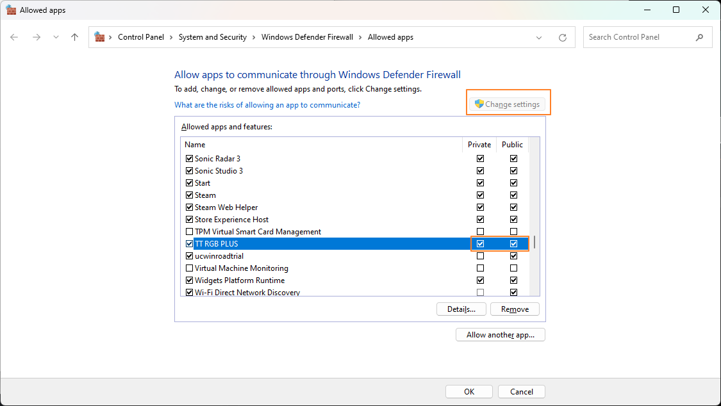
- Please disable any firewall that may be blocking the TT RGB PLUS 3.0 software.
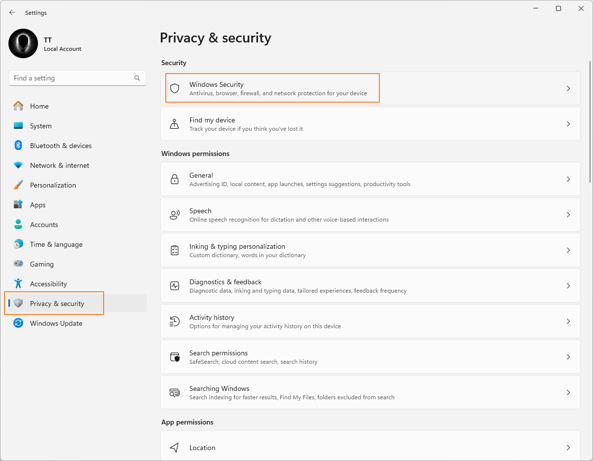
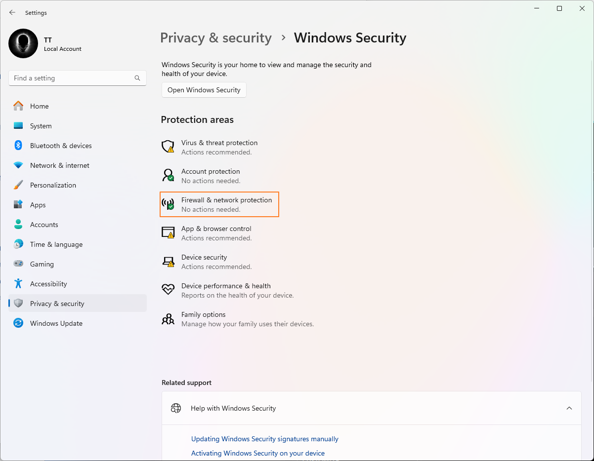
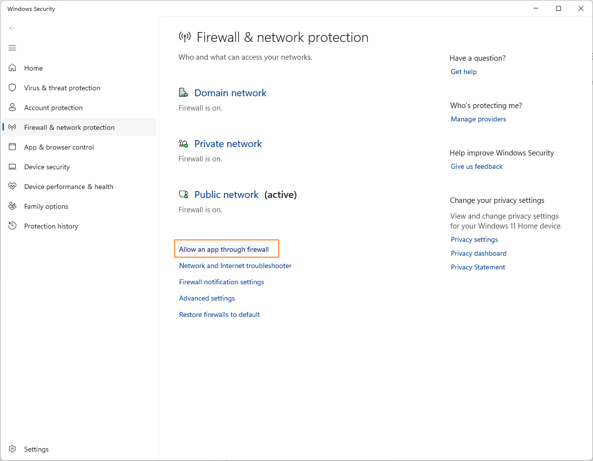
Follow the Windows settings path below to allow the TT RGB PLUS 3.0 software through the firewall:
Settings⭢ Privacy & security ⭢ Windows Security ⭢ Firewall & Network Protection ⭢ Allow an app through the
firewall
Step 1
Step 2
Step 3
Step 4